作成:
Calc Page(CodePen)
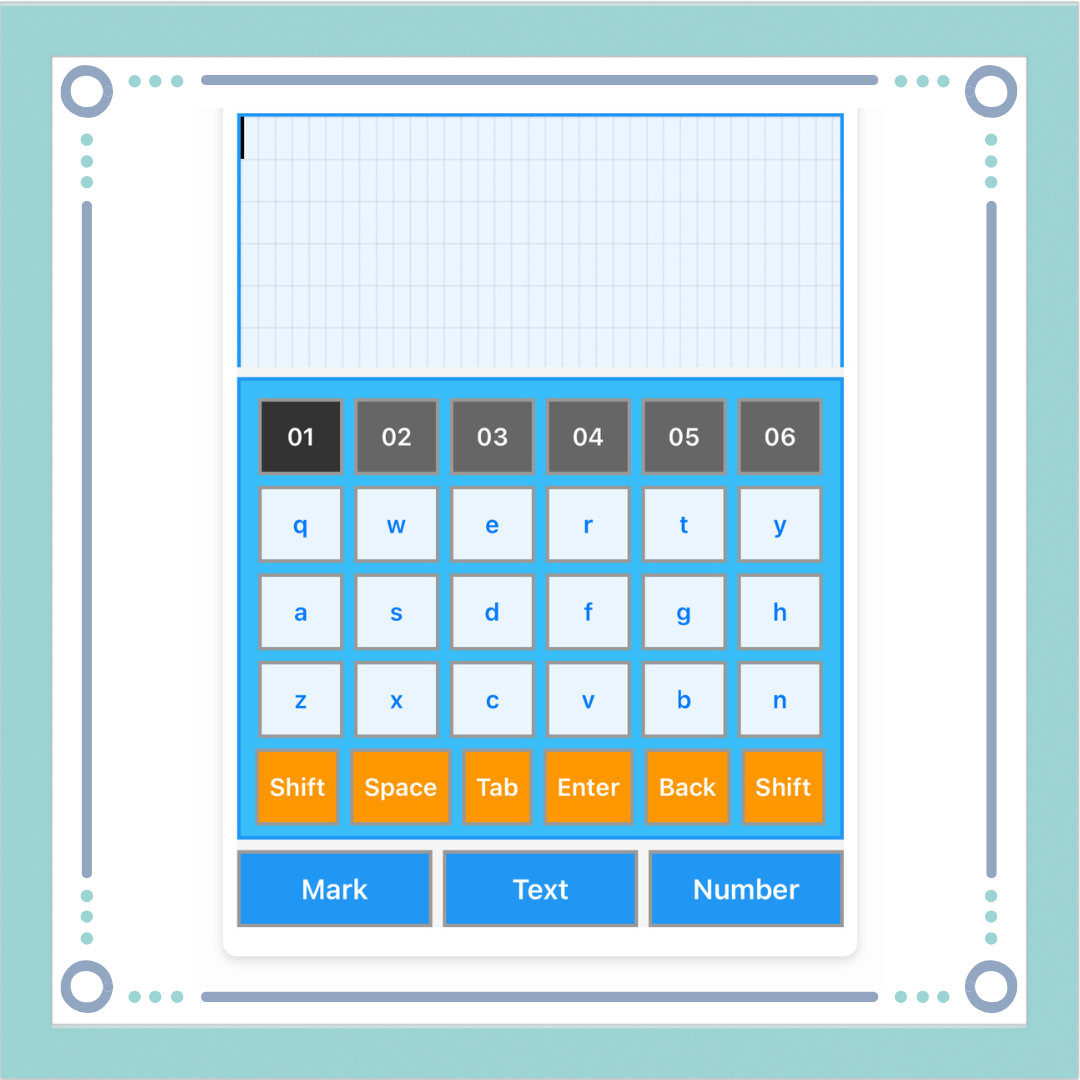
<div id="keyboad-app-all">

  <!-- ===== エディタエリア ===== -->
  <div class="editor-area">
    <div class="editor-wrap" data-editor="01">
      <div class="editor" id="editor01"></div>
    </div>

    <div class="editor-wrap" data-editor="02">
      <div class="editor" id="editor02"></div>
    </div>

    <div class="editor-wrap" data-editor="03">
      <div class="editor" id="editor03"></div>
    </div>

    <div class="editor-wrap" data-editor="04">
      <div class="editor" id="editor04"></div>
    </div>

    <div class="editor-wrap" data-editor="05">
      <div class="editor" id="editor05"></div>
    </div>

    <div class="editor-wrap" data-editor="06">
      <div class="editor" id="editor06"></div>
    </div>

  </div>

  <!-- ===== キーボードエリア ===== -->
  <div class="keyboard-area">
    <div class="keyboard">
      <div class="keyboard-view">

        <!-- 記号 -->
        <div class="keyboard-panel panel-markpad">
          <div class="row">
            <button class="red"
                data-key="clear">AC</button>
            <button>!</button>
            <button>@</button>
            <button>#</button>
            <button>$</button>
            <button>%</button>
          </div>

          <div class="row">
            <button>^</button>
            <button>&</button>
            <button>-</button>
            <button>_</button>
            <button>/</button>
            <button>¥</button>
          </div>

          <div class="row">
            <button>:</button>
            <button>;</button>
            <button>"</button>
            <button>'</button>
            <button>?</button>
            <button>*</button>
          </div>

          <div class="row">
            <button>~</button>
            <button>,</button>
            <button>.</button>
            <button class="orange"
                data-key="undo"
                style="font-size: 25px;">↩︎</button>
            <button class="gray func"
                data-key="up">↑</button>
            <button class="orange"
                data-key="redo"
                style="font-size: 25px;">↪︎</button>
          </div>

          <div class="row">
            <button>|</button>
            <button><</button>
            <button>></button>
            <button class="gray func"
                data-key="left">←</button>
            <button class="gray func"
                data-key="down">↓</button>
            <button class="gray func"
                data-key="right">→</button>
          </div>
        </div>


        <!-- 左側 -->
        <div class="keyboard-panel panel-text active">
          <div class="row">
            <button class="gray-light editor-btn"
                data-editor="01"
                data-key="switch">01</button>
            <button class="gray-light editor-btn"
                data-editor="02"
                data-key="switch">02</button>
            <button class="gray-light editor-btn"
                data-editor="03"
                data-key="switch">03</button>
            <button class="gray-light editor-btn"
                data-editor="04"
                data-key="switch">04</button>
            <button class="gray-light editor-btn"
                data-editor="05"
                data-key="switch">05</button>
            <button class="gray-light editor-btn"
                data-editor="06"
                data-key="switch">06</button>
          </div>

          <div class="row">
            <button data-value="Q"
                data-label="q">q</button>
            <button data-value="W"
                data-label="w">w</button>
            <button data-value="E"
                data-label="e">e</button>
            <button data-value="R"
                data-label="r">r</button>
            <button data-value="T"
                data-label="t">t</button>
            <button data-value="Y"
                data-label="y">y</button>
          </div>

          <div class="row">
            <button data-value="A"
                data-label="a">a</button>
            <button data-value="S"
                data-label="s">s</button>
            <button data-value="D"
                data-label="d">d</button>
            <button data-value="F"
                data-label="f">f</button>
            <button data-value="G"
                data-label="g">g</button>
            <button data-value="H"
                data-label="h">h</button>
          </div>

          <div class="row">
            <button data-value="Z"
                data-label="z">z</button>
            <button data-value="X"
                data-label="x">x</button>
            <button data-value="C"
                data-label="c">c</button>
            <button data-value="V"
                data-label="v">v</button>
            <button data-value="B"
                data-label="b">b</button>
            <button data-value="N"
                data-label="n">n</button>
          </div>

          <div class="row">
            <button class="orange func"
                data-key="shift">Shift</button>
            <button class="orange func"
                data-key="space">Space</button>
            <button class="orange">Tab</button>
            <button class="orange func"
                data-key="enter">Enter</button>
            <button class="orange func"
                data-key="back">Back</button>
            <button class="orange func"
                data-key="shift">Shift</button>
          </div>
        </div>

        <!-- テンキー -->
        <div class="keyboard-panel panel-numpad">
          <div class="numpad">
            <div class="row">
              <button></button>
              <button></button>
              <button class="gray-light">(</button>
              <button class="gray-light">.</button>
              <button class="gray-light">)</button>
              <button class="gray">÷</button>
            </div>

            <div class="row">
              <button data-value="U"
                data-label="u">u</button>
              <button data-value="O"
                data-label="o">o</button>
              <button class="gray-light">7</button>
              <button class="gray-light">8</button>
              <button class="gray-light">9</button>
              <button class="gray">×</button>
            </div>

            <div class="row">
              <button data-value="J"
                data-label="j">j</button>
              <button data-value="L"
                data-label="l">l</button>
              <button class="gray-light">4</button>
              <button class="gray-light">5</button>
              <button class="gray-light">6</button>
              <button class="gray">-</button>
            </div>

            <div class="row">
              <button data-value="M"
                data-label="m">m</button>
              <button data-value="P"
                data-label="p">p</button>
              <button class="gray-light">1</button>
              <button class="gray-light">2</button>
              <button class="gray-light">3</button>
              <button class="gray">+</button>
            </div>

            <div class="row">
              <button data-value="K"
                data-label="k">k</button>
              <button data-value="I"
                data-label="i">i</button>
              <button class="gray-light">0</button>
              <button class="gray-light">00</button>
              <button class="gray-light">000</button>
              <button class="gray">=</button>
            </div>
          </div>
        </div>

      </div>
    </div>

    <!-- 切替 -->
    <div class="keyboard-switch">
      <button data-target="markpad">Mark</button>
      <button data-target="textpad">Text</button>
      <button data-target="numpad">Number</button>
    </div>
  </div>

</div>
$bg-boad: #38bdf8;
$bg-red: #ef4444;
$bg-blue: #2196f3;
$bg-orange: #ff9800;
$bg-yellow: #eaf5ff;
$bg-white: #fff;
$bg-black: #999;
$bg-glay: #333;
$bg-gray-light: #666;

#keyboad-app-all {
  height: 95vh;
  display: flex;
  flex-direction: column;
  background: #f5f5f5;
}

.editor-area {
  flex: 1;
  overflow-y: auto;
  margin-bottom: 6px;
}

.keyboard-area {
  flex-shrink: 0;
}

.editor {
  background: $bg-yellow;
  border: 2px solid $bg-blue;
  position: relative;
  font-family: monospace;
  font-size: 16px;
  line-height: 24px;
  white-space: pre-wrap;
  word-break: break-word;

  background-image:
    repeating-linear-gradient(
      to right,
      rgba(0,0,0,0.06) 0,
      rgba(0,0,0,0.06) 1px,
      transparent 1px,
      transparent 1ch
    ),
    repeating-linear-gradient(
      to bottom,
      rgba(0,0,0,0.06) 0,
      rgba(0,0,0,0.06) 1px,
      transparent 1px,
      transparent 24px
    );
}

.editor-wrap {
  display: none;
}

.editor-wrap.active {
  display: block;
  overflow-y: auto;
}

.editor-btn.active {
  background: $bg-glay;
}

.tab {
  display: inline-block;
  width: 4ch;
}

.cursor {
  display: inline-block;
  width: 2px;
  height: 24px;
  background: #000;
  vertical-align: bottom;
  animation: blink 1s steps(2) infinite;
}

@keyframes blink {
  0% { opacity: 1; }
  50% { opacity: 0; }
}

.keyboard {
  background: $bg-boad;
  border: 2px solid $bg-blue;
  margin-bottom: 6px;
}

.keyboard-view {
  padding: 10px;
  height: 240px;
}

.keyboard-panel {
  display: none;
}

.keyboard-panel.active {
  display: block;
}

.row {
  display: flex;
  justify-content: center;
  gap: 6px;
  margin-bottom: 6px;

  button {
    height: 44px;
    border: 2px solid $bg-black;
    background: $bg-yellow;
    font-size: 14px;
    flex: 1;
  }
}

button.orange {
  background: $bg-orange;
  color: $bg-white;
}

button.red {
  background: $bg-red;
  color: $bg-white;
}

button.gray {
  background: $bg-glay;
  color: $bg-white;
}

button.gray-light {
  background: $bg-gray-light;
  color: $bg-white;
}

button.func.active {
  background: $bg-red;
  color: $bg-white;
}

.keyboard-switch {
  display: flex;
  gap: 6px;

  button {
    flex: 1;
    height: 44px;
    font-size: 16px;
    background: $bg-blue;
    color: $bg-white;
    border: 2px solid $bg-black;
  }
}
let textBuffer = "\n\n\n\n\n\n\n";
let cursorPos = 0;
let isShift = false;
let history = [];
let historyIndex = -1;
const editors = {};
let currentEditorId = "01";
showEditor("01");
renderEditor();

function saveHistory() {
  const snapshot = {
    textBuffer: textBuffer,
    cursorPos: cursorPos
  };
  history = history.slice(0, historyIndex + 1);
  history.push(snapshot);
  historyIndex++;
}

function initEditor(id) {
  if (!editors[id]) {
    editors[id] = {
      textBuffer: "\n\n\n\n\n\n\n",
      cursorPos: 0,
      history: [],
      historyIndex: -1
    };
  }
}

function visualize(str) {
  return str
    .replace(/&/g, "&")
    .replace(/</g, "<")
    .replace(/>/g, ">")
    .replace(/ /g, '<span class="space"> </span>')
    .replace(/\t/g, '<span class="tab"></span>')
    .replace(/\n/g, "<br>");
}

/* =====  エディタ切り替え ===== */
function showEditor(id) {
  if (currentEditorId) {
    initEditor(currentEditorId);
    const cur = editors[currentEditorId];
    cur.textBuffer = textBuffer;
    cur.cursorPos = cursorPos;
  }
  initEditor(id);
  currentEditorId = id;
  textBuffer = editors[id].textBuffer;
  cursorPos = editors[id].cursorPos;

  $(".editor-wrap").removeClass("active");
  $(`.editor-wrap[data-editor="${id}"]`).addClass("active");

  $(".editor-btn").removeClass("active");
  $(`.editor-btn[data-editor="${id}"]`).addClass("active");

  renderEditor();
}

/* =====  undo redo ===== */
function undo() {
  if (historyIndex <= 0) return;

  historyIndex--;
  const state = history[historyIndex];

  textBuffer = state.textBuffer;
  cursorPos = state.cursorPos;
  renderEditor();
}

function redo() {
  if (historyIndex >= history.length - 1) return;

  historyIndex++;
  const state = history[historyIndex];

  textBuffer = state.textBuffer;
  cursorPos = state.cursorPos;
  renderEditor();
}

/* ===== エディタ描画 ===== */
function renderEditor() {
  const before = visualize(textBuffer.slice(0, cursorPos));
  const after  = visualize(textBuffer.slice(cursorPos));

  $(".editor-wrap.active .editor").html(
    before + '<span class="cursor"></span>' + after
  );

  const cursor = document.querySelector(".cursor");
  if (cursor) {
    cursor.scrollIntoView({ block: "nearest" });
  }
}

/* ===== キーボード切り替え ===== */
$(".keyboard-switch button").on("click", function () {
  const target = $(this).data("target");
  $(".keyboard-panel").removeClass("active");
  if (target === "markpad")
    $(".panel-markpad").addClass("active");
  if (target === "textpad")
    $(".panel-text").addClass("active");
  if (target === "numpad")
    $(".panel-numpad").addClass("active");
});

/* ===== Shift切替 ===== */
function toggleShift() {
  isShift = !isShift;

  $(".keyboard button.func[data-key='shift']")
    .toggleClass("active", isShift);

  $(".keyboard-panel button").each(function () {
    const $btn = $(this);
    const val   = $btn.data("value");
    const label = $btn.data("label");
    if (!val || !label) return;
    if (isShift) {
      $btn.text(val);
    } else {
      $btn.text(label);
    }
  });
}

/* ===== 文字挿入 ===== */
function insertChar(char) {
  saveHistory();
  textBuffer =
    textBuffer.slice(0, cursorPos) +
    char +
    textBuffer.slice(cursorPos);
  cursorPos += char.length;
  renderEditor();
}

/* ===== Backspace ===== */
function backspace() {
  saveHistory();
  if (cursorPos === 0) return;
  textBuffer =
    textBuffer.slice(0, cursorPos - 1) +
    textBuffer.slice(cursorPos);
  cursorPos--;
  renderEditor();
}

/* ===== カーソル移動 ===== */
function moveCursor(dir) {
  if (dir === "left") {
    cursorPos
      = Math.max(0, cursorPos - 1);
    renderEditor();
    return;
  }
  if (dir === "right") {
    cursorPos
      = Math.min(textBuffer.length, cursorPos + 1);
    renderEditor();
    return;
  }
  const lines = textBuffer.split("\n");
  let line = 0;
  let col = cursorPos;
  for (let i = 0; i < lines.length; i++) {
    if (col <= lines[i].length) {
      line = i;
      break;
    }
    col -= lines[i].length + 1;
  }
  if (dir === "up") {
    if (line === 0) return;
    line--;
  }
  if (dir === "down") {
    if (line === lines.length - 1) return;
    line++;
  }
  cursorPos = 0;
  for (let i = 0; i < line; i++) {
    cursorPos += lines[i].length + 1;
  }
  cursorPos += Math.min(col, lines[line].length);

  renderEditor();
}

/* ===== キーボード操作 ===== */
$(".keyboard").on("touchstart mousedown", "button", function (e) {
  e.preventDefault();
  e.stopPropagation();

  const func = $(this).data("key");
  const val  = $(this).data("value");
  const key  = $(this).text();

// ===== エディタ切り替え(最優先)=====
if (func === "switch") {
  const id = $(this).data("editor");
  if (!id) return;
  showEditor(id);
  return;
}

// ===== 最優先!! undo redo =====
  if (func === "undo") {
    undo();
    return;
  }
  if (func === "redo") {
    redo();
    return;
  }

// ===== 最優先!! AC(All Clear)=====
  if (func === "clear") {
    const ok = confirm("すべて消去しますか?");
  if (!ok) return;
    saveHistory();
    textBuffer = "\n\n\n\n\n\n\n";
    cursorPos  = 0;
    renderEditor();
    return;
  }

  // --- 機能キー ---
  if (func === "shift") return toggleShift();
  if (func === "space") return insertChar(" ");
  if (func === "back")  return backspace();
  if (func === "enter") return insertChar("\n");
  if (func === "up")    return moveCursor("up");
  if (func === "down")  return moveCursor("down");
  if (func === "left")  return moveCursor("left");
  if (func === "right") return moveCursor("right");
  if (key === "Tab") return insertChar("\t");
  if (val) {
    insertChar($(this).text());
    return;
  }
    insertChar(key);
  });

  /* 初期描画 */
saveHistory();
renderEditor();


コメント